


Hi all ninja members!
Here a couple of quick tips that should reduce the number of double threads we've been seeing.
You'll note that here at HiDefNinja, we try to have a "standard" way of naming our threads - so they are easier for all members to find.
The naming convention is as follows:
1) Title of release
2) Type of packaging
3) Potential exclusive release to a store (if there's room)
4) Type of release if different from the norm
5) Country of Origin
Here are some examples.
Iron Man (Future Shop Exclusive Blu-ray Steelbook) -Embossed [Canada]
Rumble Fish [Masters of Cinema] (Blu-ray Steelbook) [UK]
Walkyrie (Valkyrie) (Blu-ray Steelbook)-Stickerbook[France]
If you are about to create a new thread, there are two ways you can try and verify if it does not already exist.
First, you can use the inline search feature (Check if already posted) that is to the right of the title field.
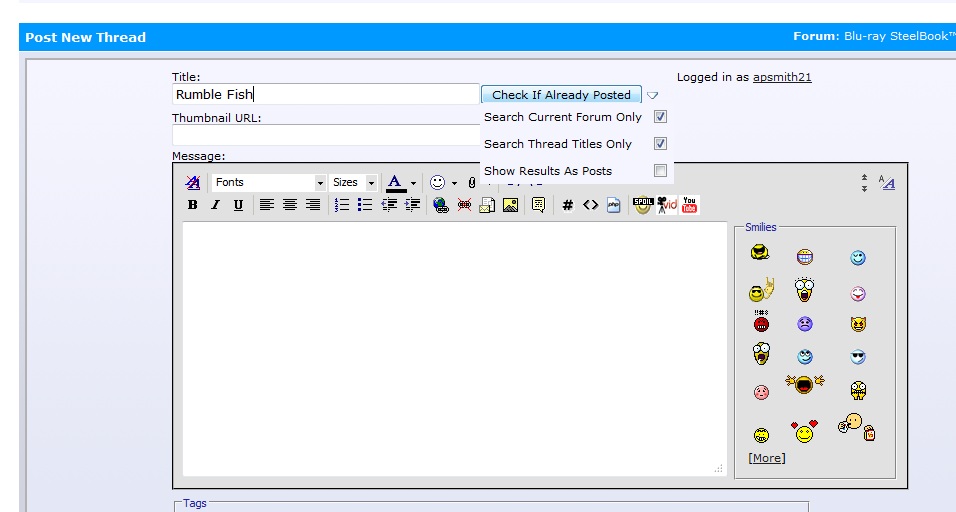
You'll note that results show in a new window, so make sure your browser will allow HiDefNinja.com to open a new window for you.
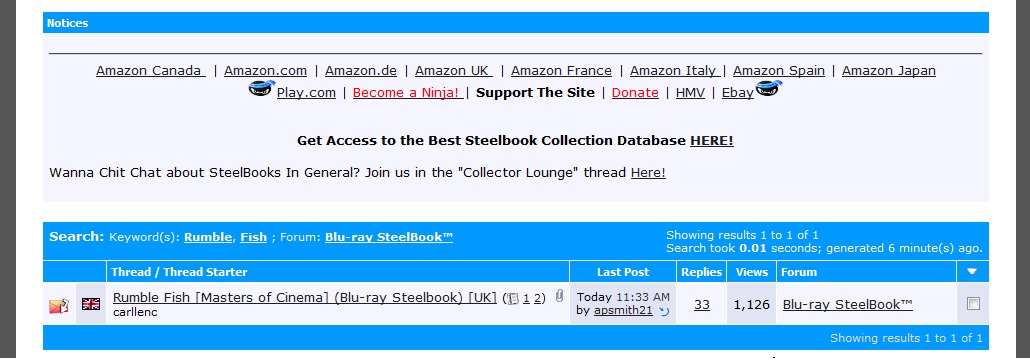
The second way you can search (the most efficient one), is to a thread title search.
This is available from the advanced menu of the search bar for the forum.
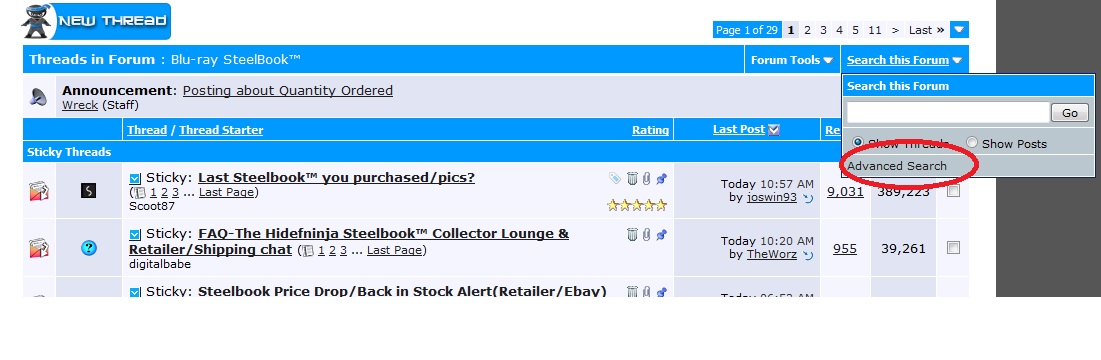
Make sure you choose "Search Titles Only"
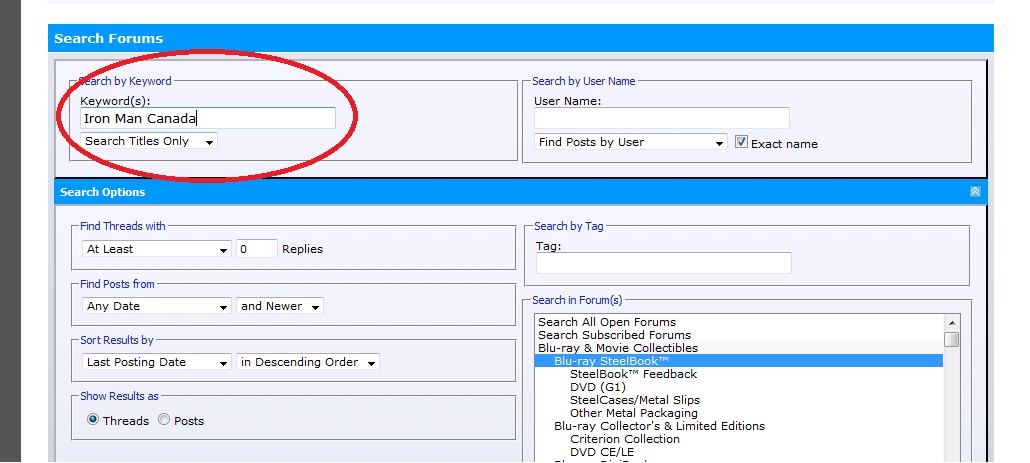
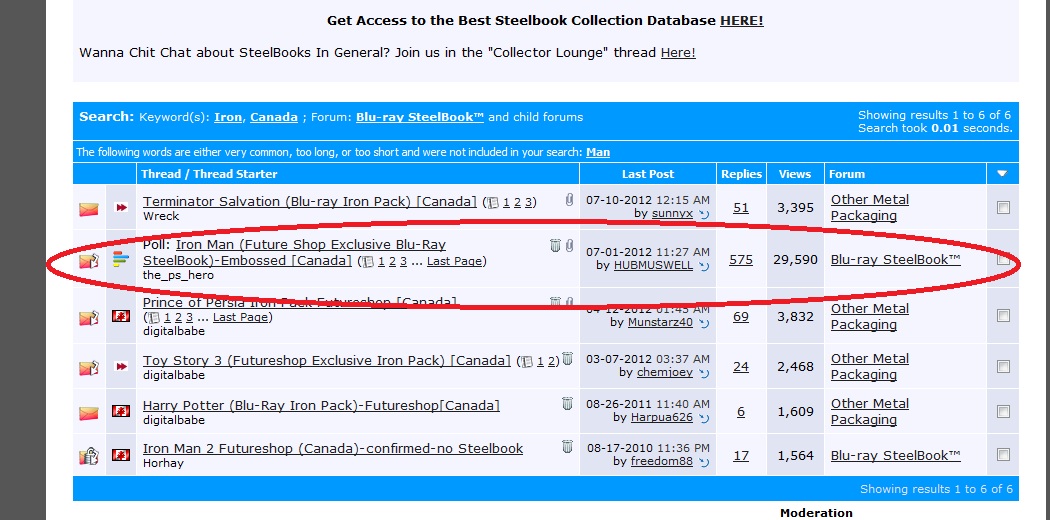
And there it is, the Iron Man I was searching for! REMEMBER, you can add more or less search terms to refine or broaden your search.
**Note that you can also do a search from our collection manager application and the discussion thread for that steelbook or collectible should be listed there.
Finally, if you're new to the forums and you are a bit nervous about creating a new thread, feel free to PM a steelbook moderator for assistance.
I hope this quick searching overview helps some of our current and new members.
Here a couple of quick tips that should reduce the number of double threads we've been seeing.
You'll note that here at HiDefNinja, we try to have a "standard" way of naming our threads - so they are easier for all members to find.
The naming convention is as follows:
1) Title of release
2) Type of packaging
3) Potential exclusive release to a store (if there's room)
4) Type of release if different from the norm
5) Country of Origin
Here are some examples.
Iron Man (Future Shop Exclusive Blu-ray Steelbook) -Embossed [Canada]
Rumble Fish [Masters of Cinema] (Blu-ray Steelbook) [UK]
Walkyrie (Valkyrie) (Blu-ray Steelbook)-Stickerbook[France]
If you are about to create a new thread, there are two ways you can try and verify if it does not already exist.
First, you can use the inline search feature (Check if already posted) that is to the right of the title field.
You'll note that results show in a new window, so make sure your browser will allow HiDefNinja.com to open a new window for you.
The second way you can search (the most efficient one), is to a thread title search.
This is available from the advanced menu of the search bar for the forum.
Make sure you choose "Search Titles Only"
And there it is, the Iron Man I was searching for! REMEMBER, you can add more or less search terms to refine or broaden your search.
**Note that you can also do a search from our collection manager application and the discussion thread for that steelbook or collectible should be listed there.
Finally, if you're new to the forums and you are a bit nervous about creating a new thread, feel free to PM a steelbook moderator for assistance.
I hope this quick searching overview helps some of our current and new members.
Last edited:



 I should have known better really that one of you sharp eyed guys would have spotted it.


