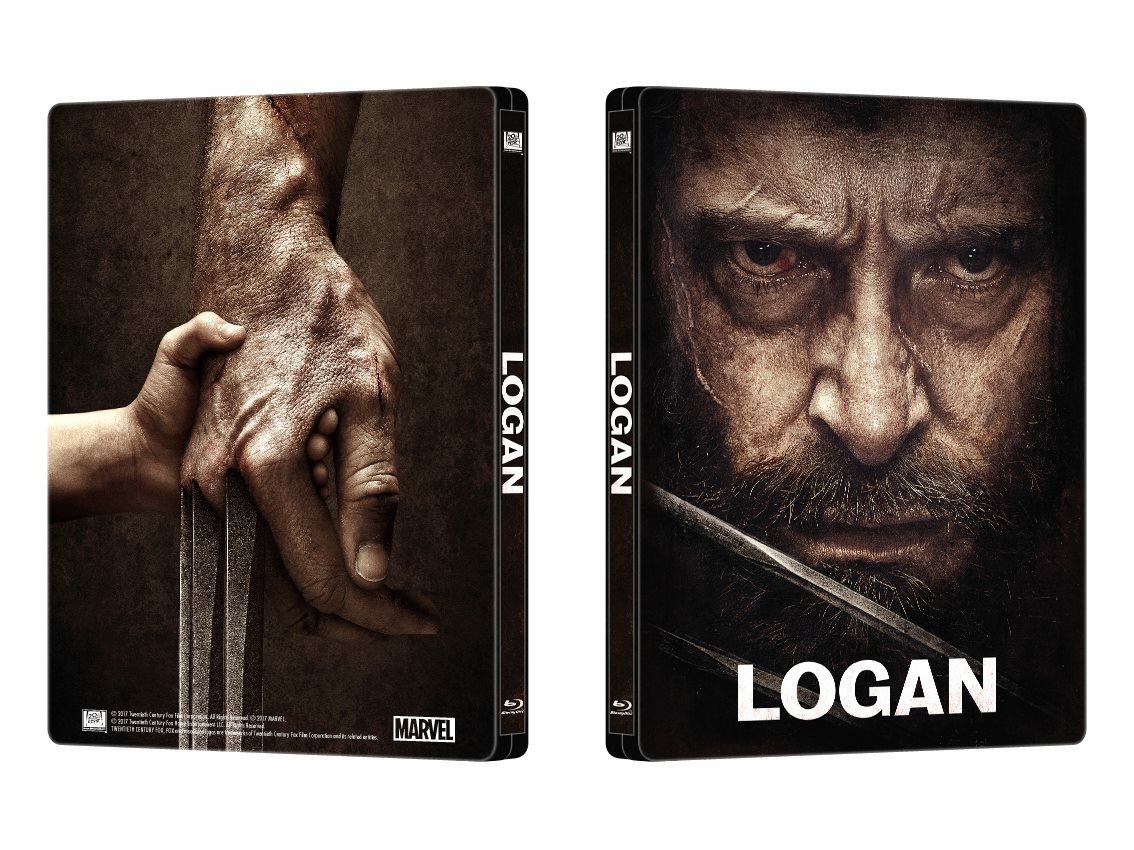
Logan (Blu-ray SteelBook) (Manta Lab Exclusive No. 8) [Hong Kong]

IRON MAN

E.D.I.T.H.
Super Moderator
Premium Supporter
Dec 28, 2012
39,476
Everywhere
Release date: August 16, 2017
Purchase links: Double Lenti - Full Slip - Special Box - One Click
Price: $45.99 (Double Lenti) - $43.99 (Full Slip) - $46.99 (Special Box) - $132.97 (One Click)
Group buy: hosted by Aniv One Click - Double Lenti - Full Slip - Special Box
Notes: 3000 numbered copies. SteelBook has full gloss and the title is debossed. Disc is locked to Region A.
Full Slip (400 copies): High Quality Full Slip + Spot Glossy + Spot Matte + Embossing
Double Lenticular Full Slip (700 copies): Super Clear 3D Lenticular x 2 + Spot Glossy +Spot Matte + Embossing
Special Box Set (700 copies): High Quality Kraft Paper Box with Magnet insert + Detachable 3D Lenticular Magnet + Spot Gloss + Spot Matte + Embossing + Full Gloss, Emboossed Quarter Slip
One Click (400 sets)

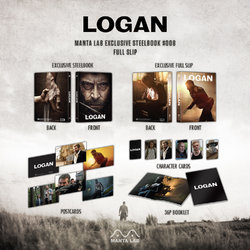
doublelenti.jpg fullslip.jpg specialbox.jpg
IMG_1889.JPG

 
Last edited:
Where do you select that option?, when you log into PayPal?
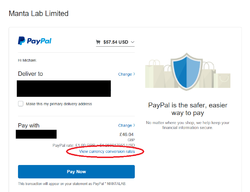
Upon the last page before submitting payment, click "view currency conversion rates". I made an example checking out with Manta's Logan Double Lenti ;)
Manta Example 1.png
(If using a mobile device or sending a payment manually, it may say "converting currency with" or "currency conversion options" but all bring up the same set of options regardless).

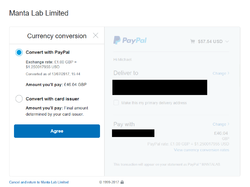
A pop-up will then appear with the following 2 options:
Manta Example 2.png

And there you go :D I've seen this discussed elsewhere on this forum and I've personally used it for ages. There was a time when the currency conversion tool stopped working and all payments had to be made through PP themselves, thus lining their pockets even further and emptying ours even deeper :rolleyes: Try it, and let me know what you think buddy. On occasions, I'll even screen grab the page before changing the options to know exactly how much I saved when I view my Bank statements ;):LOL:
 
Upon the last page before submitting payment, click "view currency conversion rates". I made an example checking out with Manta's Logan Double Lenti ;)
View attachment 322025
(If using a mobile device or sending a payment manually, it may say "converting currency with" or "currency conversion options" but all bring up the same set of options regardless).

A pop-up will then appear with the following 2 options:
View attachment 322026

And there you go :D I've seen this discussed elsewhere on this forum and I've personally used it for ages. There was a time when the currency conversion tool stopped working and all payments had to be made through PP themselves, thus lining their pockets even further and emptying ours even deeper :rolleyes: Try it, and let me know what you think buddy. On occasions, I'll even screen grab the page before changing the options to know exactly how much I saved when I view my Bank statements ;):LOL:

Cheers
Ahh ok, I'll look out for it next time.
I'm on iOS anyway so when it redirects to PayPal it don't look like your screen shot but I'll see what it says next time

I always do a trial run with PayPal before an order to see what I'm paying anyway with the total and shipping. And Considering the pound has been so crap in the last year I've had to do that to keep tabs on the exchange rate.

It went up again the other day but luckily dropped a little before this pre order lol
 
  • Thanks
Reactions: Mickle_89
Upon the last page before submitting payment, click "view currency conversion rates". I made an example checking out with Manta's Logan Double Lenti ;)
View attachment 322025
(If using a mobile device or sending a payment manually, it may say "converting currency with" or "currency conversion options" but all bring up the same set of options regardless).

A pop-up will then appear with the following 2 options:
View attachment 322026

And there you go :D I've seen this discussed elsewhere on this forum and I've personally used it for ages. There was a time when the currency conversion tool stopped working and all payments had to be made through PP themselves, thus lining their pockets even further and emptying ours even deeper :rolleyes: Try it, and let me know what you think buddy. On occasions, I'll even screen grab the page before changing the options to know exactly how much I saved when I view my Bank statements ;):LOL:

Yes I choose this option all the time even with payments on amz (with CC) or just anywhere when you can choose this option coz there will always be a better currency rate by your bank.

Btw I contact Manta regarding the shipping cost so let´s wait for an answer, but honestly I think it will be correct, coz I just checked my last order Kingsmen and there was for single edition 14,97 USD shipping costs :pain:. It is just so high for some countries I guess :smashed:
 
Upon the last page before submitting payment, click "view currency conversion rates". I made an example checking out with Manta's Logan Double Lenti ;)
View attachment 322025
(If using a mobile device or sending a payment manually, it may say "converting currency with" or "currency conversion options" but all bring up the same set of options regardless).

A pop-up will then appear with the following 2 options:
View attachment 322026

And there you go :D I've seen this discussed elsewhere on this forum and I've personally used it for ages. There was a time when the currency conversion tool stopped working and all payments had to be made through PP themselves, thus lining their pockets even further and emptying ours even deeper :rolleyes: Try it, and let me know what you think buddy. On occasions, I'll even screen grab the page before changing the options to know exactly how much I saved when I view my Bank statements ;):LOL:

Thanks for this I wouldn't have even realized we had that option and I had been just defaulting to whatever PayPal had set.
 
  • Like
Reactions: Mickle_89
Would've been good if the package was more vibrant but I suppose there aren't a lot of artworks to choose from. Think FAC won with their steelbook based on the pics. I ordered the special boxset but am in two minds now... I wasn't completely sold on the concept render, hopefully it turns out to be as special as they say
 
I'm confused as to what the special box set is. It looks like a full slip with a quarter slip inside. Sorry if this is clarified in the thread earlier. I am just jumping in here. I ordered a double lenti this morning but am just now seeing this special box. Not sure what it really is.
 
I'm confused as to what the special box set is. It looks like a full slip with a quarter slip inside. Sorry if this is clarified in the thread earlier. I am just jumping in here. I ordered a double lenti this morning but am just now seeing this special box. Not sure what it really is.
It's a box housing the 1/4 slip plus goodies. The magnetic lenticular is detachable. :thumbs:
 
  • Helpful Post
Reactions: misformatt
Upon the last page before submitting payment, click "view currency conversion rates". I made an example checking out with Manta's Logan Double Lenti ;)
View attachment 322025
(If using a mobile device or sending a payment manually, it may say "converting currency with" or "currency conversion options" but all bring up the same set of options regardless).

A pop-up will then appear with the following 2 options:
View attachment 322026

And there you go :D I've seen this discussed elsewhere on this forum and I've personally used it for ages. There was a time when the currency conversion tool stopped working and all payments had to be made through PP themselves, thus lining their pockets even further and emptying ours even deeper :rolleyes: Try it, and let me know what you think buddy. On occasions, I'll even screen grab the page before changing the options to know exactly how much I saved when I view my Bank statements ;):LOL:

What was the difference in price?
 
What was the difference in price?
For what exactly, this? I didn't screen grab this order but generally, dependant on the amount paid and the current state of the £, it can vary immensely but has always been in my favour ;)

Even when small amounts, frequent use and savings all add up :)
 

I don't see the point in 'scalping' these Manta releases if they do fetch as little as you say on ebay. Seems abit redundant to buy something at a higher cost to specifically sell on just to make a loss. Thats if who you're talking about is a scalper so to speak. I don't have anything against people selling on their collections for whatever reason whether it be to simply clear space or get them out of a financial bind, but scalping for the sake of scalping especially when making a loss I just can't understand lol
 
For what exactly, this? I didn't screen grab this order but generally, dependant on the amount paid and the current state of the £, it can vary immensely but has always been in my favour ;)

Even when small amounts, frequent use and savings all add up :)

I didn't know they let you do it actually. I tried finding a way to do it a while back but to no avail. I use the mobile app though, might be why.