


Space Jam (Blu-ray SteelBook) [UK]
- Thread starter paulboland
- Start date
You are using an out of date browser. It may not display this or other websites correctly.
You should upgrade or use an alternative browser.
You should upgrade or use an alternative browser.


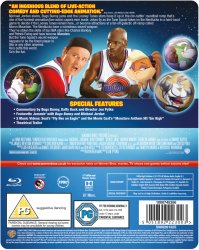


Link and discount code not working on this release
If still in stock later for a decent price drop I will purchase then
I already have previous steelbook and it's same disc in the new steelbook so I'm not in a rush to get this at the moment
If it had of been remastered version with new extras I would have pre ordered
If still in stock later for a decent price drop I will purchase then
I already have previous steelbook and it's same disc in the new steelbook so I'm not in a rush to get this at the moment
If it had of been remastered version with new extras I would have pre ordered

As much as I want this, think I'm gonna risk it and hope for a price drop... can't afford to be double dipping right now.
I forgot about it going live and didn’t get to use the code but now I’m thinking price drop too


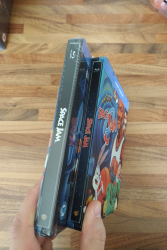

I'm sure we had a thread on here that walked you through the process of changing spines, but I can't seem to find it at the moment.Its annoying that the new steelbook has a bland title on the spine. I may try to amalgamate the 2 of them and have the coloured title on the new steelbook. Is that an easy prospect?
Plenty of videos on YouTube nowadays though, so maybe just give those a watch. I would suggest practicing on an unwanted steel first!
Here you go: steelbook spine removal - YouTube
Its annoying that the new steelbook has a bland title on the spine. I may try to amalgamate the 2 of them and have the coloured title on the new steelbook. Is that an easy prospect?
You couldn't even be bothered to post a pic of the steelbook front that noone has seen yet

Its annoying that the new steelbook has a bland title on the spine. I may try to amalgamate the 2 of them and have the coloured title on the new steelbook. Is that an easy prospect?
What’s the finish like then?
You couldn't even be bothered to post a pic of the steelbook front that noone has seen yet
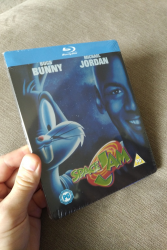
Sorry, was a little carried away with Avengers arriving and only studied the spine on this one lol. Theres a nice metallic finish to this one. I prefer the cover art on this one as it reminds me of the old quads. Plus, I always had hoped the vhs would use this cover as I recall the rental big case did but the retail release never did.What’s the finish like then?
Attachments
Yikes, thought it might be easier. Think I'd best leave it haha. Will just keep both for now.I'm sure we had a thread on here that walked you through the process of changing spines, but I can't seem to find it at the moment.
Plenty of videos on YouTube nowadays though, so maybe just give those a watch. I would suggest practicing on an unwanted steel first!
Here you go: steelbook spine removal - YouTube
Sorry, was a little carried away with Avengers arriving and only studied the spine on this one lol. Theres a nice metallic finish to this one. I prefer the cover art on this one as it reminds me of the old quads. Plus, I always had hoped the vhs would use this cover as I recall the rental big case did but the retail release never did.
Prefer this colour too. Is it gloss metallic or matte metallic?

Another option, and without having to remove the spines, is to remove all 4 plates from the steelbooks, and simply swap them around on the plastic inserts/trays. Removing plates are far easier than removing the spine IMO, and you can do so fairly easily using a plastic credit card or something similar, this method is also damage free if you do it right. Would never personally advise using a knife as some do.Its annoying that the new steelbook has a bland title on the spine. I may try to amalgamate the 2 of them and have the coloured title on the new steelbook. Is that an easy prospect?
With the steelbook open and laid flat on a solid surface, preferably on top of a soft cloth as to not cause any scratches etc whilst working on it, using a credit card (or similar thin/hard plastic card) - place the card between the metal edge of the steelbook and the inner plastic tray, starting on the top inside edge (corner beside the spine) and work your way outwards. It should detach close to the spine edge and you can then remove/pop off the plate with your hands. When you do the back, just turn the steelbook upside down so it's the same way as when removing the front plate.
Again, it's a little difficult to explain but there are threads/vids like @Noodles has said that would show how to remove plates.
I just thought this way you'd end up with the steelbook and spine you want, and should be an easier way to go about it if you really wanted to. If you've not removed plates before, obviously try it first on an old steelbook you don't care about lol. I did it for the first time using my Buried steelbook



Prefer this colour too. Is it gloss metallic or matte metallic?
I'm pretty certain its gloss given its sheen.
Another option, and without having to remove the spines, is to remove all 4 plates from the steelbooks, and simply swap them around on the plastic inserts/trays. Removing plates are far easier than removing the spine IMO, and you can do so fairly easily using a plastic credit card or something similar, this method is also damage free if you do it right. Would never personally advise using a knife as some do.
With the steelbook open and laid flat on a solid surface, preferably on top of a soft cloth as to not cause any scratches etc whilst working on it, using a credit card (or similar thin/hard plastic card) - place the card between the metal edge of the steelbook and the inner plastic tray, starting on the top inside edge (corner beside the spine) and work your way outwards. It should detach close to the spine edge and you can then remove/pop off the plate with your hands. When you do the back, just turn the steelbook upside down so it's the same way as when removing the front plate.
Again, it's a little difficult to explain but there are threads/vids like @Noodles has said that would show how to remove plates.
I just thought this way you'd end up with the steelbook and spine you want, and should be an easier way to go about it if you really wanted to. If you've not removed plates before, obviously try it first on an old steelbook you don't care about lol. I did it for the first time using my Buried steelbook
Duh! Haha, i was too busy thinking about how to remove the spine that actually I didn't even think of this which makes totale sense and given the video I watched, very do-able. I may actually give this a go.
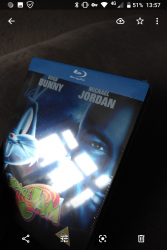
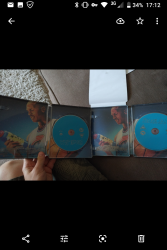
I opened the steelbook and amazingly, they are both the same inner but alas slightly positioned differently. Given where the ball is and how on one spine it pours into and the other doesn't, I think Michael's neck would just look to out of place. 
Attachments
Have to admit I'm a big fan of the Classic Warner cartoons but dear God this film is a mess. Really does not do the classic cartoons justice......
Similar threads

- Replies
- 10
- Views
- 1K

- Replies
- 2
- Views
- 418

- Replies
- 1
- Views
- 421
- Replies
- 6
- Views
- 940

