SteelBook Photography Advice

Nightowl

Jedi Ninja
Premium Supporter
Jan 18, 2011
1,095
Los Angeles
Not sure where to put this, so apologies to the mods if this in in the wrong place ...

I'm curious about some of the basic gear for taking some of the high quality photos of SteelBooks that many of you take.

What sort of lighting kits do you use and/ or recommend? And what sort of surface material do you shoot on? Also, do you guys think using a mobile device's camera would be sufficient, or is a dedicated shooter a must-have (I've got a Samsung Galaxy Note which has an 8mp camera)?

As for lighting, I've been experimenting with an IKEA LED desk lamp that I've put some white cloth over in an attempt to diffuse the light. And I have a black mat on my desk that's sort of leathery looking.

Below is an example of the kind of quality I can get right now, but would like to take it to the next level if it wouldn't involve a major monetary investment.

sincity2.jpg
 
are you using your macro function, Nightowl? It should be a button with a flower on it.

I'm using a 5.1 Megapixel Fujifilm FinePix A-500 that I bought for $60 like 5 or 6 years ago.
 
Last edited:
are you using your macro function, Nightowl? It should be a button with a flower on it.

I'm using a 5.1 Megapixel Fujifilm FinePix A-500 that I bought for $60 like 5 or 6 years ago.

Blu, I'm using the camera in my Samsung Galaxy Note. Its 8mp and I have the settings as follows ...

ISO = Auto (experimenting with different ISO levels in different lighting and for different textures)
White Balance = Auto
Focus = Auto (tap screen)
Metering = Center-weighted (not sure what that means)
Contrast = Auto
Anti-shake = Off
Flash = Off (using natural lighting)
 
Megabee,

What do you mean by, 'proper custom WB'? Also, should the goal be to get something that looks white to our eye be as white as possible in the shot? Or do we let the camera just do its thing?

Some cameras (and all that shoot RAW) have possibility to set WB to match specific conditions. All cameras have auto WB. Most have WB for sunshine/cloud/tungsten/fluorescent etc.

UPD: I wee that you use Samsung, the RAW format is unavailable, and custom WB either.
 
Last edited:
Some cameras (and all that shoot RAW) have possibility to set WB to match specific conditions. All cameras has auto WB. Most have WB for sunshine/cloud/tungsten/fluorescent etc.
For custom WB you put neutral object in place of what you shoot and either make a shot and then select it or just shoot it. You need to read camera manual how to do this. After that that object will be reproduced as neutral. If it were really neutral, the WB setting will be matched to lighting. You may try to shoot white piece of paper. Although it is not really white, the result may be more pleasing. Or you can rely on automatic WB detection from camera.

When shooting in RAW format (if your camera has it), you may adjust WB to your taste afterwards.

You will also need to remember to set WB to auto afterwards, when shooting something different or colors will wrong.

Oh, WB means white balance. :) So, yeah, I'm familiar with the WB settings on my camera and leave it on auto most of the time. I actually did an auto-adjust process after the fact on the Gremlins slipcover shot, and it tweaked the WB a little bit and def made it pop a bit more.

Unfortunately, my camera only saves to Jpeg files since its a phone camera.

---------- Post added at 02:18 PM ---------- Previous post was at 02:14 PM ----------

I did some searching for you. If you're using the N7000, you do have a macro mode on your camera. Turn it on and try shooting some pics.

Here's a wiki.....
http://en.wikipedia.org/wiki/Macrophotography

Ahhh, OK, thanks! I've got the US version (N7000 is international), but mine has the Macro mode in the Focus options. I'll experiment with this mode next. Thanks!
 
another one I just shot using Macro + Flash...
008.jpg


and I wouldn't normally use this type of picture because of the excess flash on the object, but I love the way the title pops out...
011.jpg
 
Last edited by a moderator:
another one I just shot using Macro + Flash...
View attachment 8914


and I wouldn't normally use this type of picture because of the excess flash on the object, but I love the way the title pops out...
View attachment 8915

The three-quarters photo definitely pops, has that in your face look. I'm very curious to experiment with macro mode now. :)

---------- Post added at 02:35 PM ---------- Previous post was at 02:33 PM ----------

I love this photo posted Megabee :scat: Not the usual front from an angle picture.
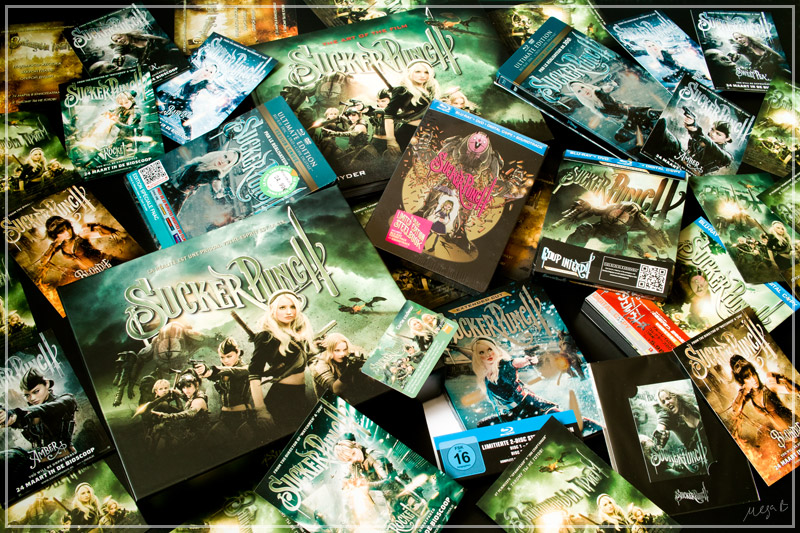
suckerglobal-small.jpg

Ya, I saw this in his collections thread and I think it looks great! Its definitely an outstanding combo of not only technical understanding but artistic merit as well. It looks slightly over-saturated to me, which makes the myriad of different colors pop.
 
Last edited by a moderator:
I love this photo posted Megabee :scat: Not the usual front from an angle picture.
suckerglobal-small.jpg
I almost did the same with Kick-Ass, but now Canada and UK announced new steels, I might want to wait till I get 'em.

---------- Post added at 01:38 AM ---------- Previous post was at 01:36 AM ----------

It looks slightly over-saturated to me, which makes the myriad of different colors pop.
That was intentional. I always do this.
 
Adding a bit of contrast does make a huge difference. I added a touch to the Gremlins slipcover pic, side by side with the one I previously posted ...

Gremlins+Slipcover+3+and+4+side+by+side.jpg
 
I wish it was my job.
Photography is just very very expensive hobby of mine, I haven't made any significant money out of it.

+1

Adding a bit of contrast does make a huge difference. I added a touch to the Gremlins slipcover pic, side by side with the one I previously posted ...

Gremlins+Slipcover+3+and+4+side+by+side.jpg

You've made fast progress in a day buddy :scat:
