SteelBook Photography Advice

Nightowl

Jedi Ninja
Premium Supporter
Jan 18, 2011
1,095
Los Angeles
Not sure where to put this, so apologies to the mods if this in in the wrong place ...

I'm curious about some of the basic gear for taking some of the high quality photos of SteelBooks that many of you take.

What sort of lighting kits do you use and/ or recommend? And what sort of surface material do you shoot on? Also, do you guys think using a mobile device's camera would be sufficient, or is a dedicated shooter a must-have (I've got a Samsung Galaxy Note which has an 8mp camera)?

As for lighting, I've been experimenting with an IKEA LED desk lamp that I've put some white cloth over in an attempt to diffuse the light. And I have a black mat on my desk that's sort of leathery looking.

Below is an example of the kind of quality I can get right now, but would like to take it to the next level if it wouldn't involve a major monetary investment.

sincity2.jpg
 
I'm not an expert, but a great picture is based on your own vision. I have seen some great photographer on here....they have their own style.

Some uses software to enhance and create their own style as well.

The diagonal shot above is quite boring now...seems like most people shoot it that way...even I did when I first started.. MegaBee does it well...actually..he's the best one in my opinion....he knows how to display his pictures.

There is one user on the BD site where I love the way he shoot his steelbook and crop it with a standard front/back and inside layout...very nice style. I think his name is Mr.Toto.

I think Elena is showing a different style by putting it all in 1 picture...very nice concept..and new.

If you can come up with something new...then people appreciate it more.

In terms of equipment, I guess you'll need a camera pod to put your camera on. I have one of those lighting kit, and I don't like it much...stop using it...
 
Last edited:
Thanks so far for the advice, guys. :) I appreciate the critique of the style of the photo, but as this is purely for my edification I'm more interested in the PQ of the photos and how to best improve it without spending an arm and a leg. :D
 
Last edited:
I'm sure many will agree with me when I say natural sunlight is the best form of lighting. I find that using a plain, non-reflective backdrop works best too. And obviously a fairly decent camera always helps as well. :)
 
PQ? You shouldn't have to spend too much at all...learn the basic, color, etc and all the features of your camera. If you know how to use those features, then I'm guess you can create an amazing PQ. Get some software...it helps a lot. After you learn about lighting, and then you'll might be interested in investing in those light kits.

I find it easier for me to put it on AUTO and point and shoot LOL...
 
Another good photographer is desmondc. I wish I had a tenth of the talent of people mentioned as all mine seem to turn out pretty crap. :( As I said on a recent post think I'll have to enroll on a proper photography course.
 
  • Like
Reactions: desmondc
Thanks guys for appreciate my photos :)

@ Nightowl : all member's advise above are true, so basically you need some device to enchant your picture quality but if you're an expert you don't need expensive devices,
i.e : high end camera, lightning, background, etc. I have a friend here that can beat my photo's quality only with his 5 megapixel phone camera.
I suggest you to use sun lightning for better lightning and edit it using some software (corel or photoshop), but in my experience you must choose right for the surface background, i.e using black surface for white steels.
Hope this helps you and feel free to PM me if you have any question, I'll try to help you as much as possible :)
 
  • Like
Reactions: surfury and Noodles
Thanks guys for all your kind words.

I do think quality-wise the priorities are the following: light and background > camera > post-processing.

You need good light. Sunlight from the window (but not direct sunshine) is usually good. Sometimes you may want to do some fill light by using some a4/letter of bigger piece of paper as an additional reflector. This would make shadows less hash.
If lighting is bad you can't fix it with camera or by any reasonable processing.

The problem with sunlight is that it can vary, or can be unavailable. Artificial lighting is always available. But not all artificial light types are good for photography. The good source is tungsten and flash (but see below). LED has bad spectrum, white LED for the eye is not white to camera, and fluorescent type is even worse. Trying to fix these with white balance settings will not produce proper colors anyway. The absolute worst is mixture of different light types or colors. It will produce uncorrectable color casts in highlights or shadows. Safe mixtures are only flash+sunlight or flash+correcting filter on flash+tungsten.

On-camera pop-up flash is evil because it frequently produces glare, and also gives very flat picture. This is because the flash illuminates what it "sees", the lens records what it sees, and because their axes are so close, they see the same, so there will be minimal shadows. It is the shadow pattern that defines volume.

As for background, some plain colors are best. White, black, and neutral gray are good to mix with any steelbook color. I use plastic blacks, whites and some others. There are special plastic photographic backgrounds. You can also get black plastic from from shops for painters, or even easier, you can go to office supplies store and look for table pads. For some time I was using black 50*90 cm pad of Durable brand. It has very good grainy texture. The only issue with it should not be stored rolled, otherwise you would need several hours before it staightens.

Black bkg is better than white beause of psychology. Human look often follows from dark to bright areas. Bright areas attract more viewer attention than dark ones.

To be continued...
 
Last edited:
Elena, Megabee, thanks so much for chiming in. So it sounds like sunlight and a good background will be the key, or a good understanding of artificial light. Because I live in Southern California, sunlight is usually not a problem (as I look out my window right now I can see a perfect blue sky forming after the sunrise).

I think what I'll do is head down to my local arts and crafts shop and pick up some dark, matte materials for a background or two, and try shooting in the sunlight on one of our many clear, sunny days here.

I think I'll start by mastering that with my existing Note's camera and then move on to learning about post processing with software (of which I already know a little about, but not a lot).

Along the way I'll certainly experiment so that I find my own style, and I'll definitely be back soon with more questions. :)
 
Last edited:
Camera-wise, you do not need fancy camera to make good steelbook pictures.
Entry-level DSLR is more than enough. Good compact camera is also enough.
Tripod is recommended for sharp images and frame composing, but given enough light, you may try shooting handheld. For compact cameras, even dirt cheap smallish tripod will be enough, but with it it's better to use 2 or 10 seconds shutter delay. Preferable shooting mode is aperture priority or sometimes fully manual. If light allows, loswest native ISO should be used (usually 100 or 200).

There is one more very important thing, may bethe most important: practice. Practice! Don't be afraid, the steelbook will not bite or run away. Look at it from different angles, find the best angles, orientations, light-to-steel, steel-to-camera.

For embossed it is good if you can shape part of light so that it is almost tangential to steel surface. This will uncover all the embossing shape. Debossing is done slightly different, but general ideas of shape reproduction are the same. There is, however one caveat, the dust will be very annoying. If you do such kind of lighting, it's better have some slightly wet towel at hand or there will be a nightmare at postprocessing.

As for post processing itself, I don't do much of it. Just the usual stuff like brightness/contrast, hilights/shadows, cropping, dust removal, and adding frame. Sometimes it is also fixing edges of background or some color tweaks, but this is rare.
The power of software can fix your dented, or scratched steel, or paint chips. It will look like new. Yeah, you can do many more fancy things with Photoshop, like correct everything, but it is generally easier and quicker to fix errors during shooting, rather than spend hours trying to fix in post. The stellbook will still be here to redo.
 
Last edited:
@ nightowl : do megabee ways step by step and you will get what you're looking for :)

@ megabee : just curious, is photograph is your job or just your hobby ?
 
Taking one step at a time I decided to snap a photo of one of my favorite slipcovers in natural daylight, the rest of the gear being the same. Today is as clear and sunny as it can get and I think the end result is much better ...

Gremlins+Slipcover+2.jpg


I think the only problem with using natural sunlight in my place is that my windows have a very slight tint to them, which I would guess messes ever so slightly with the color balance. Still, I think the lighting in this picture produced a better result than the artificial lighting did with the picture in the first post.

Next, to experiment with different backgrounds and angles. The learning continues. :)
 
Last edited:
Taking one step at a time I decided to snap a photo of one of my favorite slipcovers in natural daylight, the rest of the gear being the same. Today is as clear and sunny as it can get and I think the end result is much better ...

Gremlins+Slipcover+2.jpg

I think the only problem with using natural sunlight in my place is that my windows have a very slight tint to them, which I would guess messes ever so slightly with the color balance. Still, I think the lighting in this picture produced a better result than the artificial lighting did with the picture in the first post.

Next, to experiment with different backgrounds and angles. The learning continues. :)

That's much better. If you do proper custom WB, that tint does not matter. But you need to know that some objects that seem to be white are not white to camera (i.e. not neutral). White paper is the obvious example.

The only thing that may be difficult with natural light is that it cannot be well controlled or shaped. To show embossing on that slipcover, it's easier to use artificial light, but that's the next level.

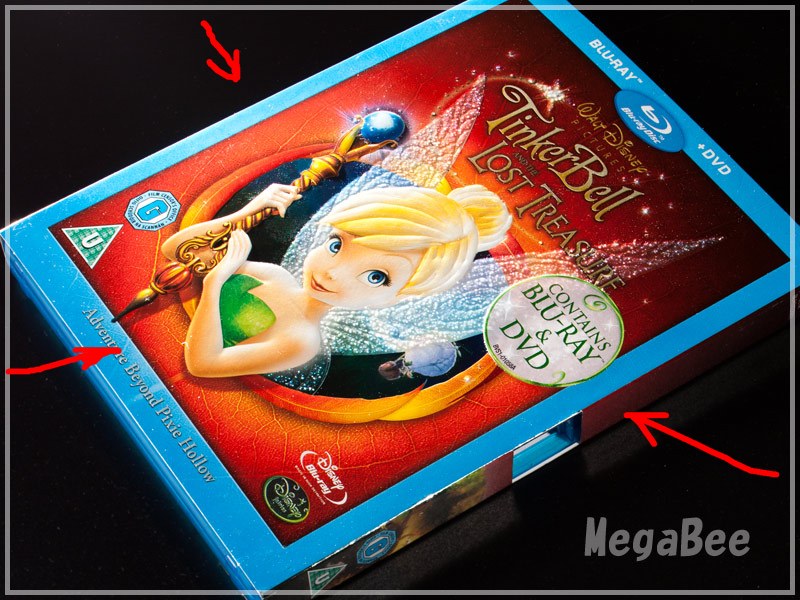
Here is what I did almost 2 years ago with 3 lights, the arrows are light directions. One light was specifically shaped so that the image 'pops' a bit, and texture is shown
tinker2-1dir.jpg
 
Last edited:
Megabee,

What do you mean by, 'proper custom WB'? Also, should the goal be to get something that looks white to our eye be as white as possible in the shot? Or do we let the camera just do its thing?