


News By Kunal Khullar via Tom's Hardware
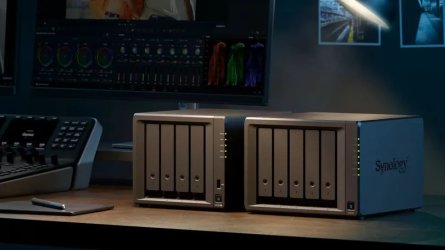
Synology has backtracked on its controversial self-branded drives-only policy, restoring the ability to use third-party and certified HDDs and SSDs on its 2025 Plus series NAS units. With the launch of its latest DiskStation Manager 7.3, users can once again use 3.5-inch hard drives and 2.5-inch SATA SSDs from brands like Western Digital and Seagate, without losing out on crucial features.
Earlier this year, the company had restricted core functionality for third-party and non-certified drives, including support for storage pools, health monitoring, deduplication, and firmware updates. The company made Synology-branded and Synology-certified drives compulsory, claiming that users of the Plus series NAS models would benefit from higher performance, increased reliability, and more efficient support.
In a way, the company forced users to rely solely on Synology-branded disks to unlock full capabilities. This reportedly resulted in community backlash, which eventually allowed rival brands to take advantage and promote their own hardware as more open and flexible alternatives.
For context, Synology does not manufacture its own hard drives. Instead, the company uses rebranded drives from popular vendors such as Seagate, Toshiba, or Western Digital, and applies a custom firmware. This firmware effectively acts as a form of digital rights management (DRM), which ensures that only these specific drives can access the NAS system’s full range of features and performance options.
With the latest update, Synology has restored some crucial features and aligned newer NAS models, including the DiskStation DS925+ and DiskStation DS1525,+ closer to how its NAS systems worked before introducing the policy. The company is also said to be working with major drive manufacturers to broaden the range of officially certified storage options.
With the latest update, Synology has restored some crucial features and aligned newer NAS models, including the DiskStation DS925+ and DiskStation DS1525,+ closer to how its NAS systems worked before introducing the policy. The company is also said to be working with major drive manufacturers to broaden the range of officially certified storage options.
Notably, the change does not apply to M.2 storage drives, meaning that creating storage pools still requires drives from the official Hardware Compatibility List.
Apart from restoring third-party drive support, Synology’s DiskStation Manager 7.3 introduces important upgrades focusing on performance, security, and flexibility. According to the official release notes, users will get access to intelligent data tiering for better storage efficiency, new security indicators for improved threat detection, support for native exFAT for external devices, email moderation for MailPlus, and enhanced collaboration tools like shared labels and advanced file locking in Synology Drive. The update also adds AI integration through the Synology AI Console with data masking and filtering.
Follow Tom's Hardware on Google News, or add us as a preferred source, to get our up-to-date news, analysis, and reviews in your feeds. Make sure to click the Follow button!
The company has removed restrictions on third-party drives
Synology has backtracked on its controversial self-branded drives-only policy, restoring the ability to use third-party and certified HDDs and SSDs on its 2025 Plus series NAS units. With the launch of its latest DiskStation Manager 7.3, users can once again use 3.5-inch hard drives and 2.5-inch SATA SSDs from brands like Western Digital and Seagate, without losing out on crucial features.
Earlier this year, the company had restricted core functionality for third-party and non-certified drives, including support for storage pools, health monitoring, deduplication, and firmware updates. The company made Synology-branded and Synology-certified drives compulsory, claiming that users of the Plus series NAS models would benefit from higher performance, increased reliability, and more efficient support.
In a way, the company forced users to rely solely on Synology-branded disks to unlock full capabilities. This reportedly resulted in community backlash, which eventually allowed rival brands to take advantage and promote their own hardware as more open and flexible alternatives.
For context, Synology does not manufacture its own hard drives. Instead, the company uses rebranded drives from popular vendors such as Seagate, Toshiba, or Western Digital, and applies a custom firmware. This firmware effectively acts as a form of digital rights management (DRM), which ensures that only these specific drives can access the NAS system’s full range of features and performance options.
With the latest update, Synology has restored some crucial features and aligned newer NAS models, including the DiskStation DS925+ and DiskStation DS1525,+ closer to how its NAS systems worked before introducing the policy. The company is also said to be working with major drive manufacturers to broaden the range of officially certified storage options.
With the latest update, Synology has restored some crucial features and aligned newer NAS models, including the DiskStation DS925+ and DiskStation DS1525,+ closer to how its NAS systems worked before introducing the policy. The company is also said to be working with major drive manufacturers to broaden the range of officially certified storage options.
Notably, the change does not apply to M.2 storage drives, meaning that creating storage pools still requires drives from the official Hardware Compatibility List.
Apart from restoring third-party drive support, Synology’s DiskStation Manager 7.3 introduces important upgrades focusing on performance, security, and flexibility. According to the official release notes, users will get access to intelligent data tiering for better storage efficiency, new security indicators for improved threat detection, support for native exFAT for external devices, email moderation for MailPlus, and enhanced collaboration tools like shared labels and advanced file locking in Synology Drive. The update also adds AI integration through the Synology AI Console with data masking and filtering.
Follow Tom's Hardware on Google News, or add us as a preferred source, to get our up-to-date news, analysis, and reviews in your feeds. Make sure to click the Follow button!



