Modifying SteelBooks

Feb 17, 2010
42
Share how you modify your Steelbooks here.

diy1.png
 
Last edited by a moderator:
Commissioner Gordon getting some love! For all you Oldman fans. ;)

DSCN1962.JPG


spine matches too. :)
 

Attachments

  • DSCN1963.jpg
    DSCN1963.jpg
    28.2 KB · Views: 122
Last edited by a moderator:
  • Like
Reactions: GVZER and mllNY
Good topic, lots of perfectionists out there and I will know now what to do aswell. I dont really get why we have all the digital download discs or triple play sets, just the disc and the extras is fine. Although i guess you can't argue with value for money. lol
 
Nice presentation! What kind of case are you using for the outside? Are those the plastic slip cases I've seen on other threads, that expose the top and bottom of the case? Something else??

Thanks for the insight.

Matt

Hey bro, there's a Group Buy for these in case your interested. I don't know if John has any more but I'm sure he can acquire some for you. I have them for my SteelBooks and they work awesome. They protect your SteelBook and at the same time allow for easy access to it as well.
Cheers. :)
 
Last edited by a moderator:
  • Like
Reactions: mfc90125
My First Effort

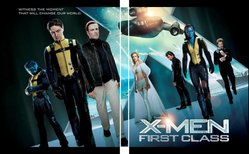
Greetings, all - been catching up on everyone's terrific efforts to print backdrops for steelbooks. I completed the attached version for X-Men: FC, but when I printed it on test paper, I noticed it was slightly smaller. In addition, I noticed a black bar on the top and bottom, probably based on the original image I got here: (http://www.themoviedb.org/movie/49538-x-men-first-class/backdrops). I'm trying to place it in the UK version.

I haven't tried to print it at Kinkos yet, for fear I might not have the right dimensions. :ohno:

Anyone here offering free advice on how I can make adjustments to this?

Thanks!
Matt
 

Attachments

  • X-Men Backdrop Completed.jpg
    X-Men Backdrop Completed.jpg
    55.5 KB · Views: 120
Greetings, all - been catching up on everyone's terrific efforts to print backdrops for steelbooks. I completed the attached version for X-Men: FC, but when I printed it on test paper, I noticed it was slightly smaller. In addition, I noticed a black bar on the top and bottom, probably based on the original image I got here: (http://www.themoviedb.org/movie/49538-x-men-first-class/backdrops). I'm trying to place it in the UK version.

I haven't tried to print it at Kinkos yet, for fear I might not have the right dimensions. :ohno:

Anyone here offering free advice on how I can make adjustments to this?

Thanks!
Matt

Have PhotoShop open
Drag or open your template into it (located HERE)
Open the photo or backdrop you want also into PhotoShop
Go back to your template and select Magic Wand and select each of the three black boxes
Go back to your backdrop and click Ctrl+A to select it and then Ctrl+C to copy it
Go back to your template and click on Edit and drill down until you see Paste Special and then select Paste Into
This will only use the selected regions to place the picture into
Next select the Move tool and then drag and form your picture just how you want it inside the black area filling it completely
Once you have it all set save it as a .PNG file.

It should come out looking like this.
TemplateCapture.jpg


I hope this helps. :)
 
Last edited:
Hey Acid - thanks for the directions in PhotoShop but I was using the free Gimp program that was mentioned on this board. If anyone tries to print the file I originally submitted, let me know if yours came out blurry or pixelated, as it did on my 600dpi laser printer. Granted it was only a test but I'm worried about going to the Kinkos counter and getting laughed out the door. :ohno:
 
Just finished this one.
The Red Cliff steelbook comes with one disc holder, is the edited down version and have no interior art.. I got the international version with is the uncut film. Good thing the Ghost Rider BB empty steel is only $5 and has 3 disc holders.

And so the I switched out the disc holders and put my own custom interior art in it.

This is everything before hand.
scaled.php

scaled.php


And this is everything after.

scaled.php

scaled.php


This hybrid has enough room for the original disc that came with the Red Cliff steel and space for the 2 international discs.
 
Nice work lewisbcfc, from a local too :welcome:

Wonder how long before we see some of the new US wave in here :D

---------- Post added at 07:00 AM ---------- Previous post was at 06:56 AM ----------

scaled.php


This hybrid has enough room for the original disc that came with the Red Cliff steel and space for the 2 international discs.

Very nice will519 :drool:

That ones been in the back of my mind for a while seeind as i have the 2 disc amary may well have to rush that one forward seeing that! Once June is over of course :oohyeah:
 
Impressive,very impressive! Nice work & the sensible thing to do with the 3disc holder in ghost rider.Why they put that in there is strange,but it does help us modifiers out for cheap conversion!:hilarious:
 
Just finished this one.
The Red Cliff steelbook comes with one disc holder, is the edited down version and have no interior art.. I got the international version with is the uncut film. Good thing the Ghost Rider BB empty steel is only $5 and has 3 disc holders.

And so the I switched out the disc holders and put my own custom interior art in it.

This is everything before hand.
scaled.php

scaled.php

And this is everything after.

scaled.php

scaled.php

This hybrid has enough room for the original disc that came with the Red Cliff steel and space for the 2 international discs.

Very nice work Will. I really like that backdrop too. :)
 
  • Like
Reactions: sutti69