

Region Free Blu-ray Players (World Wide List)
- Thread starter Wreck
- Start date
You are using an out of date browser. It may not display this or other websites correctly.
You should upgrade or use an alternative browser.
You should upgrade or use an alternative browser.


Best buy has refurbished Insignia BLu ray player region free for $49.99
http://www.bestbuy.com/site/Insignia%26%23153%3B+-+Refurbished+Wi-Fi+Built-In+Blu-ray+Player/2097354.p?id=1218309062301&skuId=2097354&st=insignia%20blu%20ray%20player&cp=1&lp=4
Ordered one!!!!
http://www.bestbuy.com/site/Insignia%26%23153%3B+-+Refurbished+Wi-Fi+Built-In+Blu-ray+Player/2097354.p?id=1218309062301&skuId=2097354&st=insignia%20blu%20ray%20player&cp=1&lp=4
Ordered one!!!!
Last edited:


So kewl, I finally got my HTPC working. Now can watch any region Blu-ray or DVD courtesy of AnyDVD HD. I could not for the life of me figure out what was wrong with it. I couldn't get signal over to my HDTV.Stupid HDMI cable was bad and my AnyDVD HD software needed upgrading.
Replaced cable and upgraded software...
No longer limited by Region B locked titles any more.
I love my HTPC too especially the AnyDVD HD software! It is an awesome piece of software.
---------- Post added at 08:23 PM ---------- Previous post was at 08:20 PM ----------
Best buy has refurbished Insignia BLu ray player region free for $49.99
http://www.bestbuy.com/site/Insignia%26%23153%3B+-+Refurbished+Wi-Fi+Built-In+Blu-ray+Player/2097354.p?id=1218309062301&skuId=2097354&st=insignia%20blu%20ray%20player&cp=1&lp=4
Ordered one!!!!
Wow, with free shipping too! This is an awesome deal! Yup, just bought one
Thanks ocielz!
Best buy has refurbished Insignia BLu ray player region free for $49.99
http://www.bestbuy.com/site/Insignia%26%23153%3B+-+Refurbished+Wi-Fi+Built-In+Blu-ray+Player/2097354.p?id=1218309062301&skuId=2097354&st=insignia%20blu%20ray%20player&cp=1&lp=4
Ordered one!!!!
I think thats the one that steelbook86 got above, and said it worked.
I had this one.
Attachments
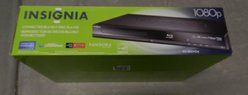
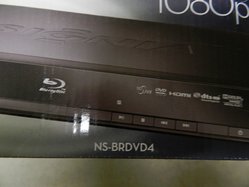
If you have probs, PM me ... I've had 2 of these (while diff model than yours) but I've had one work "out the box" and another I had to do some other setting stuff.
ps. you're getting a refurb, when I got my refurb the batteries in the remote were dead. So just an FYI in case the remote doesnt work ;change the batteries.
ps. you're getting a refurb, when I got my refurb the batteries in the remote were dead. So just an FYI in case the remote doesnt work ;change the batteries.
Can't wait to test it out
Free delivery??? How'd you manage that??
Probably because I am a Premier Silver Rewards Member? I thought it was free for everyone.
Hey Wreck I found a thread on another forum with the firmware downloads for about 4 different Insignia models. It downgrades the firmware if they come upgraded.
---------- Post added at 11:33 PM ---------- Previous post was at 11:32 PM ----------

---------- Post added at 11:33 PM ---------- Previous post was at 11:32 PM ----------
Yeah I think that's one of the perks for Premier members. Haven't been to Buying a lot of stuff from BB lately.Probably because I am a Premier Silver Rewards Member? I thought it was free for everyone.
Yeah I think that's one of the perks for Premier members. Haven't been to Buying a lot of stuff from BB lately.
I don't usually buy from BB except we had to get a new refrigerator and washer. That probably did it. Anyway, thanks for the tip!

Best buy has refurbished Insignia BLu ray player region free for $49.99
http://www.bestbuy.com/site/Insignia%26%23153%3B+-+Refurbished+Wi-Fi+Built-In+Blu-ray+Player/2097354.p?id=1218309062301&skuId=2097354&st=insignia%20blu%20ray%20player&cp=1&lp=4
Ordered one!!!!
I love my HTPC too especially the AnyDVD HD software! It is an awesome piece of software.
---------- Post added at 08:23 PM ---------- Previous post was at 08:20 PM ----------
Wow, with free shipping too! This is an awesome deal! Yup, just bought one
Thanks ocielz!
I think thats the one that steelbook86 got above, and said it worked.
I had this one.
If you have probs, PM me ... I've had 2 of these (while diff model than yours) but I've had one work "out the box" and another I had to do some other setting stuff.
ps. you're getting a refurb, when I got my refurb the batteries in the remote were dead. So just an FYI in case the remote doesnt work ;change the batteries.
Oh yah that is the one I got. It has wifi built in. Ash or Ocielz if you need help getting it into region free mode let me know. It was really simple actually.
I just got this and I am amazed for $50 how much this thing does and best of all no more worries about region locked discs. But you know what really gets me going about this player.... It plays MKV FILES!!!!!! I have had a long time problem with mkv files and trying to convert them to get them to work via ps3 or otherwise and never do they work properly. So I always just ended up watching mkv videos on my computer... but not anymore!

I will put the link for the last known software that allows region free for the player you both bought shortly. Just download on a PC (no mac as it has problems with mac for some reason) and put it on a thumb drive and plug it into the player and just follow on screen and it will put it to that firmware for the player.
The remote code to get it into region free mode is 9113.
My post below as well put in here:
Ok so here is the link for the firmware you will need for your player (brdvd2) :
http://dl.dropbox.com/u/145630/20100709_NSWBRDVD2_BBY_B082_030_14.iso
All you have to do once the firmware is uploaded:
1. Turn on the player
2. Press the Home/Setup button
3. Enter 9113
4. A configure menu should appear on the left with all the other option icons
5. Scroll through the menu and pick what region the disc is.
Here is a video showing the Insignia being put into region free mode if you need further help:
http://www.youtube.com/watch?v=7sh0ESWsACM&feature=related
Hope this helps
Last edited by a moderator:
I didn't know about the MKV files, I recently got a 3D t.v. that supports them instead of watching on my small pc monitor. Sucks that the PSTriple can't play some files
Ok so here is the link for the firmware you will need for your player (brdvd2) :
http://dl.dropbox.com/u/145630/20100709_NSWBRDVD2_BBY_B082_030_14.iso
All you have to do once the firmware is uploaded:
1. Turn on the player
2. Press the Home/Setup button
3. Enter 9113
4. A configure menu should appear on the left with all the other option icons
5. Scroll through the menu and pick what region the disc is.
Here is a video showing the Insignia being put into region free mode if you need further help:
http://www.youtube.com/watch?v=7sh0ESWsACM&feature=related
Hope this helps
---------- Post added at 08:44 PM ---------- Previous post was at 08:42 PM ----------
Yeah mkv is a quirky file type not supported by many but found everywhere when you download things. Im just glad this thing supports it and now I can watch mkv files on my actual TV, lol.
http://dl.dropbox.com/u/145630/20100709_NSWBRDVD2_BBY_B082_030_14.iso
All you have to do once the firmware is uploaded:
1. Turn on the player
2. Press the Home/Setup button
3. Enter 9113
4. A configure menu should appear on the left with all the other option icons
5. Scroll through the menu and pick what region the disc is.
Here is a video showing the Insignia being put into region free mode if you need further help:
http://www.youtube.com/watch?v=7sh0ESWsACM&feature=related
Hope this helps
---------- Post added at 08:44 PM ---------- Previous post was at 08:42 PM ----------
I didn't know about the MKV files, I recently got a 3D t.v. that supports them instead of watching on my small pc monitor. Sucks that the PSTriple can't play some files
Yeah mkv is a quirky file type not supported by many but found everywhere when you download things. Im just glad this thing supports it and now I can watch mkv files on my actual TV, lol.
Last edited by a moderator:

Is Insignia player still available on any retail web-site other than eBay ?
See the link at the top of each page for this thread? Click it and you will find out soon enough.
BIG THANKS to Mr. Iluv Kate Beckinsale
No problem, Ocielz, lol. KB sure is lovely!

Will these units work in the uk , i can buy the oppo at around £499 which is a bit to much for me , i have the lg bd550 at present there is a hack for a different lg model which i think has not worked , suppose it would be easier to purchase a region a and try it i guess . if it don't work then go shopping for a multi-region player

Thank you guys, gonna order this right now 
I can finally buy one of the X-Men: FC steels now
"I am currently trying to conceal a massive erection" - Seth Rogan
I can finally buy one of the X-Men: FC steels now
KB sure is lovely!
"I am currently trying to conceal a massive erection" - Seth Rogan
So I've had the Region switched to B on my Bh200 for a while and I want to switch it back to A but I have a problem. The HDMI went out on my player and I'm using some component cables to get a signal to my tv (also a LG from 07). When I open the disc tray the screen goes black and has a "No Signal" box bounce around. I can't see what I'm doing so I don't know if I have the right HEX selected to change. If anybody can give me a detailed button guide (like press right 4 times and then up 8 times) I'm sure I can figure it out.
Similar threads

- Replies
- 4
- Views
- 180


- Replies
- 1
- Views
- 165
- Replies
- 41
- Views
- 6K

- Replies
- 7
- Views
- 803

